

Description
BuddyPress activity updates are where your community talks, but they stay inside your site. This plugin adds a Share button next to Comment and Favorite on each activity item. One click opens a row of network icons, and the update goes out with its link back to your site.
What it does
- Adds a Share button to activity items in the activity stream, on member profiles and in groups. Logged-in members see the button; visitors do not.
- Supports Facebook, X (Twitter), LinkedIn, Pinterest, WhatsApp, email, Reddit, WordPress and Pocket.
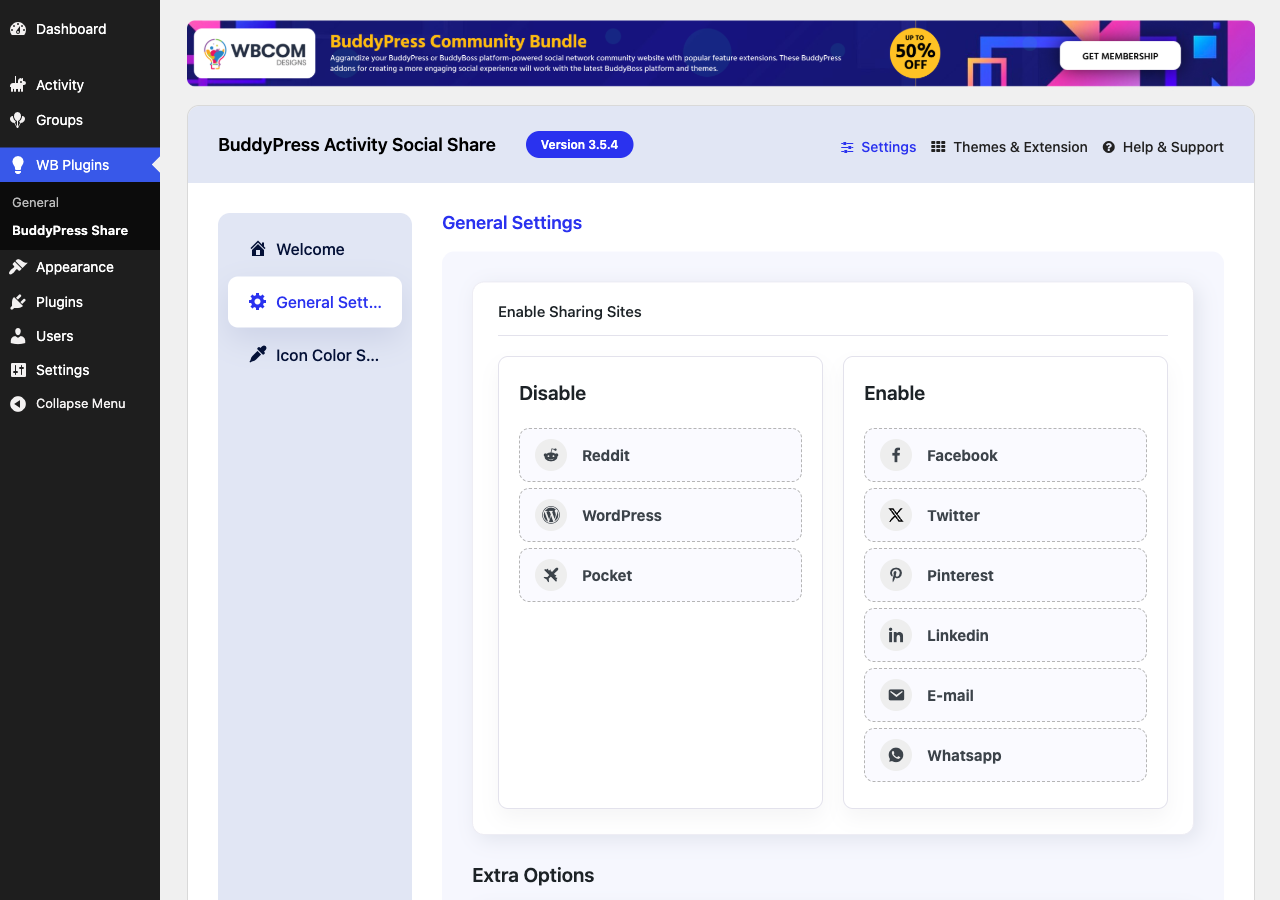
- Choose which networks appear: drag them between the Enable and Disable lists in the settings.
- Set the icon color for each network.
- Opens each network in a popup window, or in a new tab if you turn the popup off. WhatsApp and email always use their own app.
- Adds Open Graph tags to single activity pages, so shared links show a title, description and image.
- Works with BuddyPress and the BuddyBoss Platform.
Getting started
- Install and activate BuddyPress, then this plugin.
- Go to WB Plugins > BuddyPress Share > General Settings.
- Drag the networks you want into the Enable list, and the ones you do not want into the Disable list.
- Optional: set icon colors under Icon Color Settings.
Need help? Read the documentation or contact Wbcom Designs support.
More from Wbcom Designs
- BuddyX – free community theme for BuddyPress and BuddyBoss sites.
- BuddyNext – a complete community platform for WordPress.
- Jetonomy – modern discussion forums for WordPress.
- WB Gamification – points, badges and leaderboards for your members.
Screenshots


Installation
- In your WordPress admin, go to Plugins > Add New and search for « BuddyPress Activity Social Share ».
- Click Install Now, then Activate. BuddyPress must be active.
- Go to WB Plugins > BuddyPress Share to choose your networks.
FAQ
-
Does it need BuddyPress?
-
Yes. It needs BuddyPress with the Activity Streams component turned on, or the BuddyBoss Platform.
-
Logged-in members. It shows on every activity item they can see. Visitors who are not logged in do not get the button, but links that members share open normally for anyone.
-
How do I remove a network?
-
Go to WB Plugins > BuddyPress Share > General Settings and drag the network from the Enable list to the Disable list. The change saves straight away.
-
Can I open networks in a new tab instead of a popup?
-
Yes. Turn off « Open as popup window » under Extra Options on the General Settings tab.
-
Social networks cache link previews. After you change a post, ask the network to fetch the link again, for example with the Facebook Sharing Debugger.
-
Where do I get support?
-
Post in the WordPress.org support forum for this plugin, or contact Wbcom Designs support.
Reviews


Contributors & Developers
“Wbcom Designs – BuddyPress Activity Social Share” is open source software. The following people have contributed to this plugin.
Contributors

Translate “Wbcom Designs – BuddyPress Activity Social Share” into your language.
Interested in development?
Browse the code, check out the SVN repository, or subscribe to the development log by RSS.
Changelog
3.5.4
- Fixed warnings and potential fatal errors in plugin functions to ensure stability.
- Excluded WhatsApp and Email services from popup behavior for improved user experience.
- Set default enabled services to Facebook, Twitter, LinkedIn, Email, and WhatsApp.
- Enhanced Email and WhatsApp sharing links with dynamic site title and URL for better personalization.
- Fixed issue with activity share icons not displaying correctly.
- Fixed icon color settings tab responsiveness on mobile devices.
- Managed Twitter icon color with backend settings.
- Resolved deprecated warnings for compatibility with the latest standards.
- Improved backend options responsiveness for better usability.
3.5.3
- Fix: Compatibility check with WordPress 6.5.0
3.5.2
- Fix: (#142) Fixed update twitter icon
- Fix: (#143) Fixed issue with bb platform pro reaction
- Fix: (#144) Fixed issue with mail share
3.5.1
- Fix: removed unused actions
3.5.0
- Fixed: CSRF vulnerability
3.4.0
- Fixed: (#111) Added Yozify media support for og meta
- Fixed: Fixed php fatal error on plugin activation
- Fixed: (#122) Icon Color Settings UI
- Fixed: Update color setting tab icon
- Fixed: Added color library and icon color default option
3.3.1
- Fixed: Updated Admin wrapper
3.3.0
- Fix: (#87) Hide copy option in social sites dropdown
- Fix: PHPCS fixes
3.2.1
- Fix: PHPCS fixes
3.2.0
- Fix: Install Free plugin from WordPress Wrapper
3.1.0
- Fix: (#80) Removed unnecessary inline-style
- Fix: (#80) Update backend UI and remove unnecessary inline-style
- Fix: (#79) Fixed hide share button if services are not enabled
- Fix: (#78) Fixed plugin redirect to page and display error
- Fix: (#71) Managed share button UI with Kleo
- Fix: Fixed adding new social links and sortable links
- Fix: Implemented sortable social links functionality
3.0.0
- Fix: Updated backend UI
2.9.1
- Fix – Fixed social site and remove social site options
2.8.0
- Fix – Fixed missed escaping functions
- Fix – Renamed plugin Title
2.7.0
- Enhancement – Added admin option for copy activity
2.6.0
- Enhancement – #54 Added Copy to Clipboard Functionality
- Enhancement – Added Whatsapp Icon
- Fix – #68 issues with BuddyBoss Theme
2.5.0
- Enhancement – Added support for BuddyBoss Platform
- Fix – Removed default fallback to avatars
2.4.0
- Fix – Added admin notice for review
2.3.0
- Fix – update BuddyPress activation condition
2.2.1
- Fix – Removed Google+ Option as this is no longer working. #39
- Fix – Nouveau – Improve the UI of the share button. #49
2.2.0
- Fix – Removed font-awesome 5.0 #37
2.1.0
- Fix – Fixed single page error. #34
- Enhancement – Add setting for user open graph enable/disable. #35
2.0.1
- Fix – Compatibility with BuddyPress 4.3.0. #33
2.0.0
- Enhancement – Improve the Backend UI so you can manage all the wbcom plugin’s settings in one place. #31
1.2.2
- Fix – Compatibility with BuddyPress 4.1.0. #29
1.2.1
- Fix – Share on wordpress and email popup fix.
1.2.0
- Fix – BuddyPress 3.1.0 Compatible
1.1.0
- Fix – Multisite Support
1.0.7
- Fix – Enqueue position of admin css and js files
1.0.6
- Fix – Extra content display on single post pages
1.0.5
- Fixing FB shares
1.0.4
- Fixed missing thumbnail after share activity post.
- Fix – Remove the glitch by clicking the share icon.
- Enhancement – Provide a filter to change the ‘Share’ button text.
- Enhancement – Provide a filter to add new social services’ in the front end.
- Enhancement – Change the view of social share button icons.
- Enhancement – I added post content for activity sharing on Facebook and Google Plus.
1.0.3
- Fix – Translation Fixes
- Enhancement – Enable sharing for logged-out users
- Enhancement – Allow to add more social icons
1.0.2
- Third Version.
1.0.1
- Second Version.
1.0.0
- first version.
1.0.0
- JS fixes for BP 2.7.