

Description
OctaForms is a forms plugin for WordPress with two ways to use it. Drop a form on any page with the [octa_form] shortcode and no code. Or build against a small REST API and let your own theme render the markup. Either way the plugin does the hard part. It validates every submission, stores it safely and delivers it by email and signed webhook.
There is no drag-and-drop builder on purpose. You get clean, fast forms and a delivery engine you can trust, not another page builder. The whole front end is under 20 KB of JavaScript and CSS over the wire, gzipped, and it never blocks your page from rendering.
Ready to use, no code needed
- The
[octa_form slug="…"]shortcode renders any form you define, on a page or in a widget area. - A starter contact form is created for you on first run, ready to wire up to your inbox.
- On top of that, an optional contact widget. A floating button opens a small popup with up to three tabs: Call us, Request a callback and Leave a message. Each tab appears only when you have set it up.
- File uploads. Add a file field and visitors can attach a document or a photo. A file that is too big or of the wrong type is caught before the upload starts, a progress bar shows how far a large one has got, and the file arrives attached to your notification email. The limit is 10 MB per file, or your server’s own limit when that is lower.
- Uploaded files are stored outside the media library, in a protected folder under unguessable names, so nobody reaches them by pasting a URL. Delete a submission and its files go with it.
- Move forms between sites. Export the forms you pick as one file and import it on another site. Imported forms start with their emails and webhooks turned off, so nothing goes out before you check it.
- Ready for translation. Every string goes through the WordPress translation system, so the plugin picks up whatever your site language provides.
Built for developers
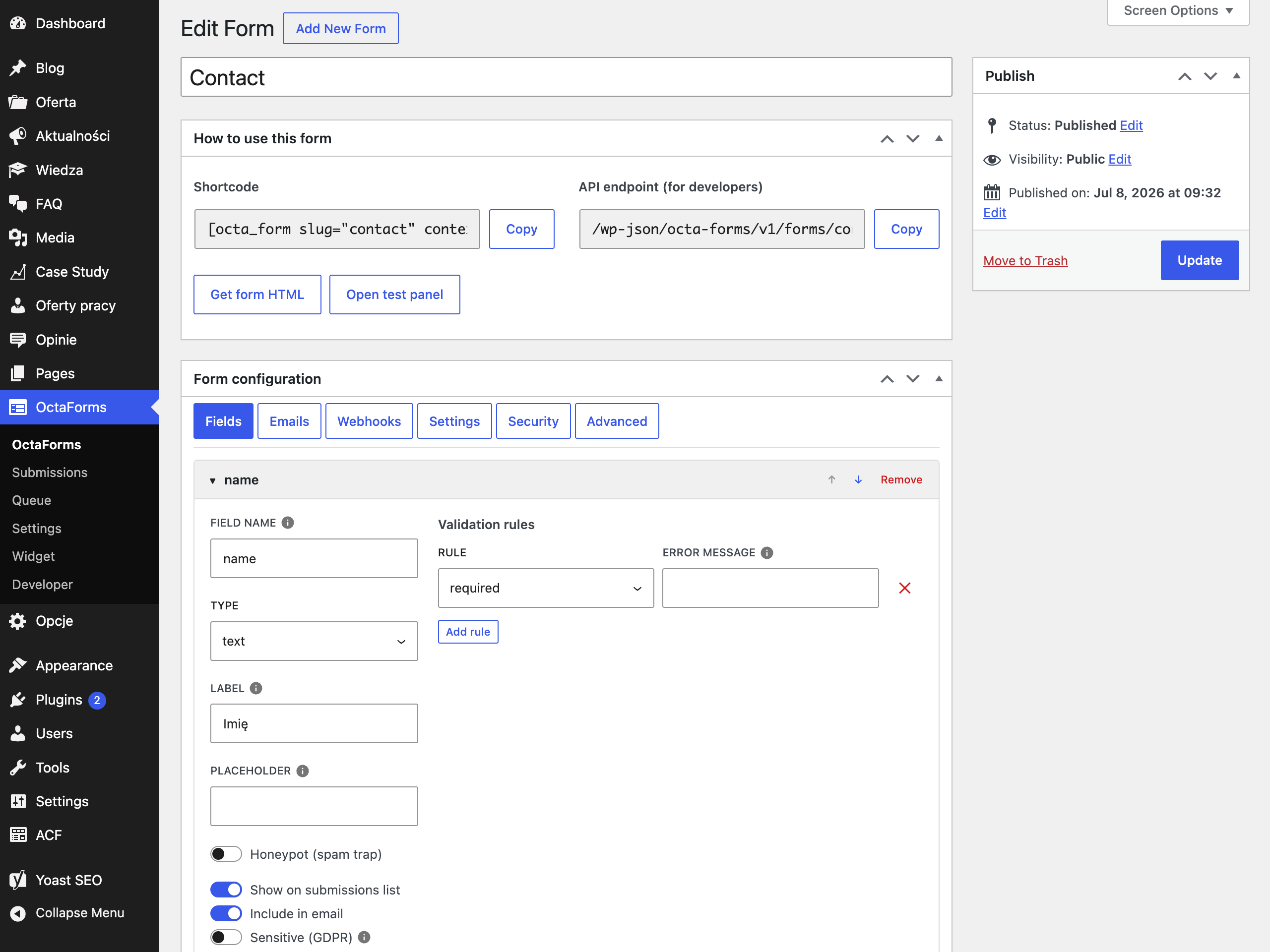
- Public REST API: a token endpoint and a per-form submissions endpoint. The form slug is a stable part of the contract and locks after you publish.
- Form definitions live as JSON on a private post type. You control the fields, validation rules, emails, webhooks and settings.
- A dry-run test panel. Preview validation, emails and webhook payloads for any form without sending an email or saving a submission.
- A validation engine with built-in rules (
required,email,tel,min,max,date,regexand more). Add your own with theocta_forms_validation_rulesfilter. - Multiple signed webhooks per form, with SSRF protection that re-checks DNS before every send. Each request carries an HMAC signature in the
X-Octa-Forms-Signatureheader, computed over the raw body. - Keep your forms in your theme. A form definition can live as a JSON file in
{theme}/data/octa-forms/, so it is versioned with the rest of your code and travels between staging and production. Import it from the admin or withwp octa-forms theme import. The database stays the source of truth at runtime, the files never are. - An optional vanilla JavaScript helper that implements the full token and retry contract for you. No framework, no build step.
- WP-CLI commands for the delivery queue, for syncing form definitions from your theme and for exporting and importing forms.
- Nothing hidden behind a build step. The JavaScript and CSS sources ship inside the plugin, in
resources/, next to the compiled files inbuild/. Runnpm installandnpm run buildto rebuild them yourself and compare. - Thorough documentation. The full guides live at https://forms.octadevs.com/, covering the REST contract, theme integration, webhooks and every hook.
Reliable delivery
OctaForms puts durability before timeliness. Every delivery is saved to a queue before the visitor gets their response. The first email attempt runs inside the request and is guarded by a circuit breaker. Anything that fails is retried by cron with exponential backoff. Nothing is ever silently lost. Every protection and every degradation leaves a trace you can read in the admin or in Site Health.
The queue also keeps itself moving. On a site where WordPress cron is starved by a page cache or a blocked loopback, ordinary visitor traffic quietly tells the queue to send what is waiting. A notification does not sit for hours because nothing happened to trigger cron. It is a safety net rather than a replacement for a real system cron, it never hides a broken cron from Site Health, and you can switch it off in Settings.
Anti-spam that does not lose real leads
- A honeypot with a spam quarantine. Suspected spam is stored, not dropped, so you can review it and recover a real submission. A sudden spike usually means you are catching real people, for example browser autofill.
- Two-counter rate limiting. A flood of requests earns a short, temporary ban. A burst of genuine successful submissions from one network, like an office behind a single IP during a campaign, gets a polite « try again shortly » instead of a ban.
- A stateless signed token that adds deduplication, a time trap and a JavaScript requirement. It is a helper, not your main defence. The honeypot and rate limiting are.
- Atomic deduplication. A double click returns the same submission and each delivery goes out once.
Measure what your forms do
- Form events reach Google Tag Manager on their own. A form start, a submission, a success, an error and every contact widget interaction land in the dataLayer, ready for you to build a conversion trigger on. You do not have to touch any code to get them there.
- The events describe the interaction, not the person. They carry the form, the place on the site and the outcome, and no visitor data at all. Nothing is sent anywhere until you build a trigger in your own tag manager, so the decision to measure stays yours.
- Every event is also available as a plain JavaScript event on the form, so your theme can react to a submission without a tag manager in the picture.
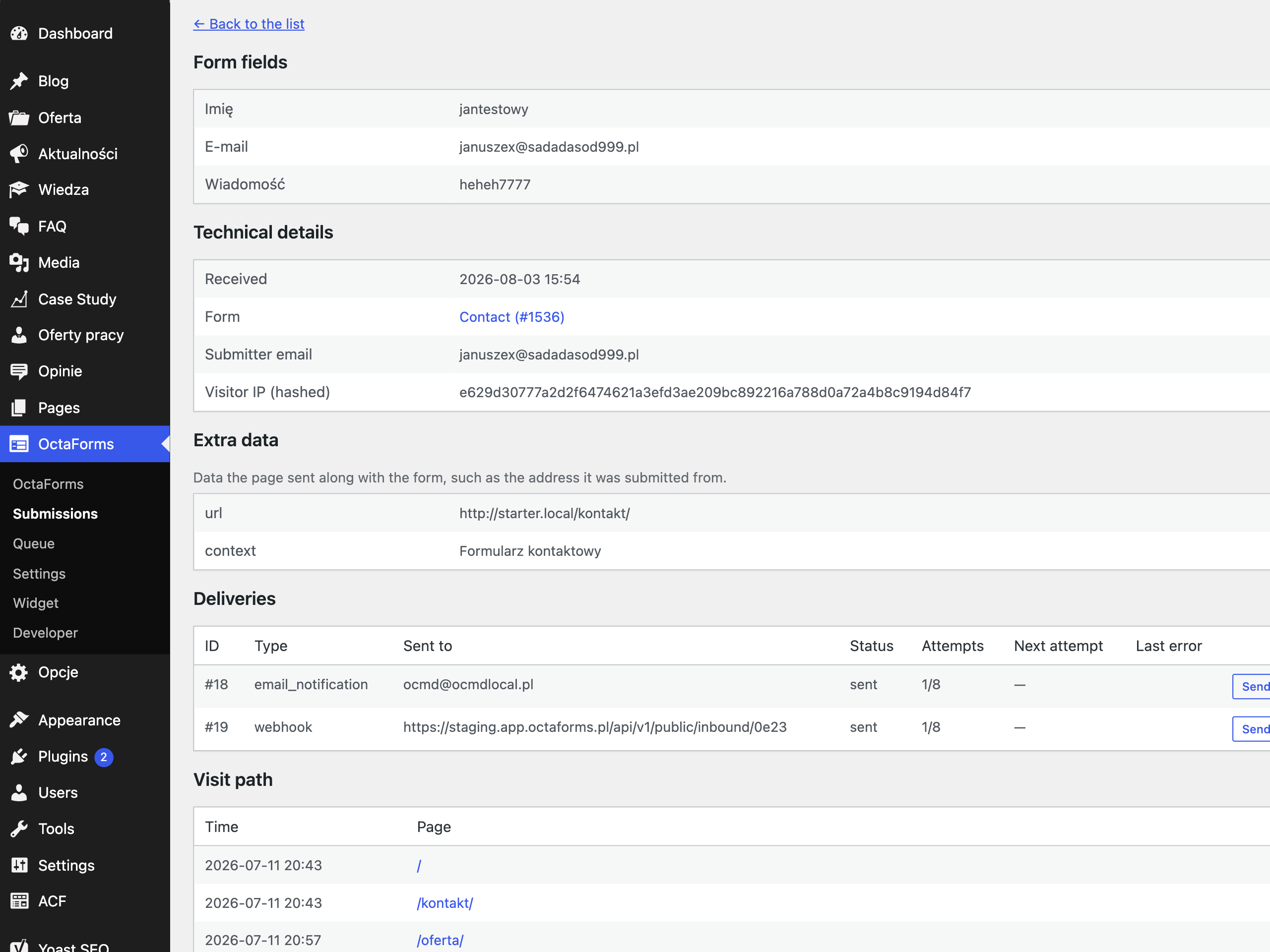
- An optional visit path records which pages someone looked at before they got in touch, so you can see what actually brought them to you. It is off by default, it stores page paths only and never the full address, and it records nothing until the visitor has agreed to analytics.
- An optional lead source shows where a visitor came from: a Google ad, Google search, Facebook or another website, plus the campaign tags (such as utm_source or gclid) of the first page they opened. It is off by default. While it is on, each submission also notes the address of the page that led to the form, without its query. Remembering the first source across pages waits for the visitor’s consent to statistics. Nothing is sent anywhere, it stays with the submission.
GDPR
- A consent snapshot stored with each submission: the field, the text that was shown, the value and the time.
- The visitor IP is stored only as a hash, kept for spam forensics. By default it never leaves your site. It is not in webhooks and not in exports. The one exception is the optional Akismet anti-spam check. If you turn it on, the submission content along with the visitor’s IP address and email are sent to Akismet to be scored for spam.
- Full integration with the WordPress « Export » and « Erase » personal data tools, covering submissions, their delivery records, the visit path and the lead source.
- Retention with automatic cleanup, global or per form, with a matching cleanup of delivery records and of any files that came with a submission. The spam quarantine always clears after 30 days.
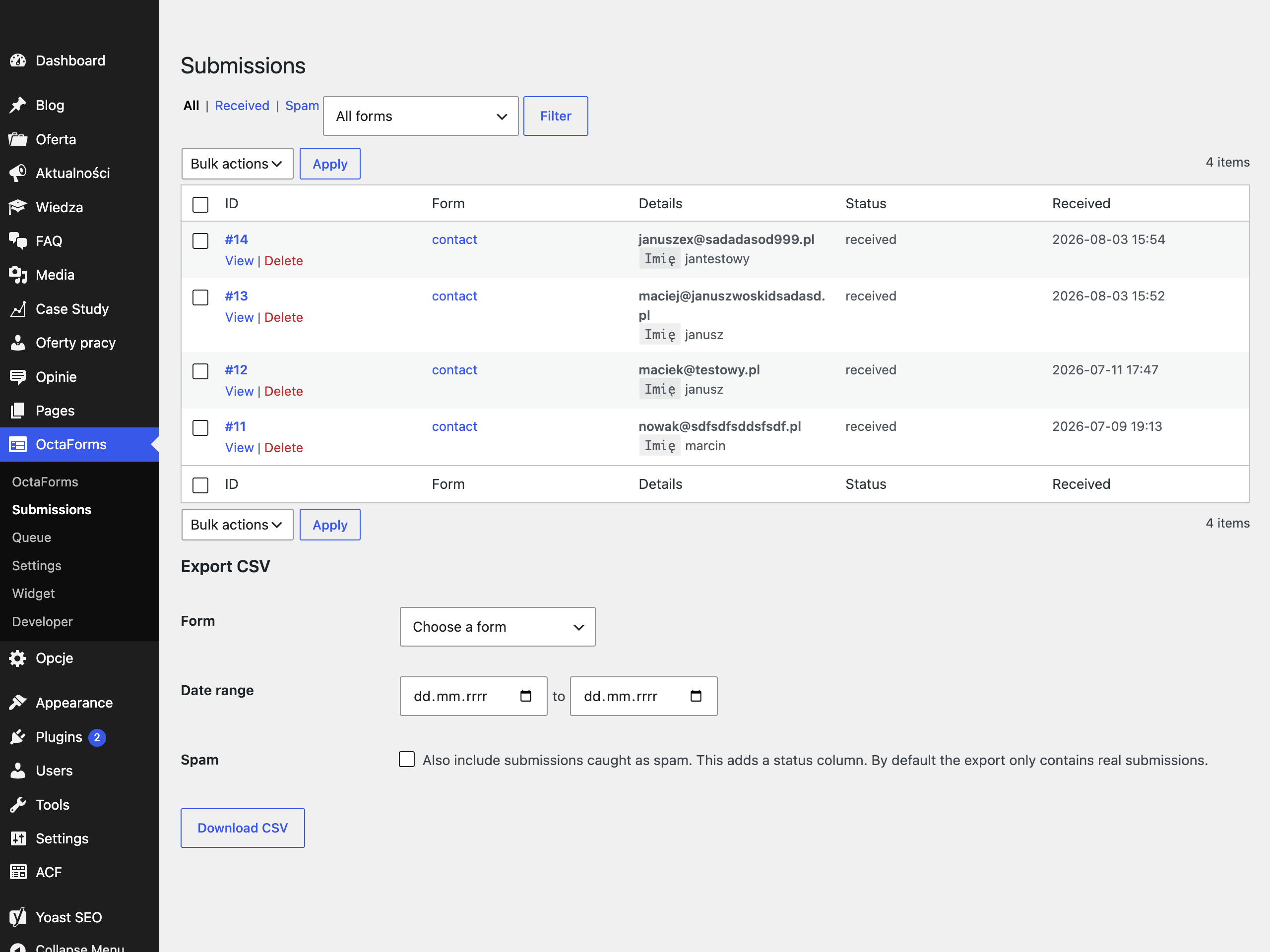
- CSV export limited to received submissions by default, hardened against spreadsheet formula injection.
- Optional full data removal on uninstall.
External services
By default OctaForms sends no data to any third party. It stores and delivers on your own site, and the plugin makes no outbound request until you turn the Akismet check on yourself.
Akismet spam checking (optional, off by default)
Akismet is a spam filtering service run by Automattic. OctaForms can send each submission to it for a spam score, so that obvious spam is quarantined instead of landing in your inbox. Nothing is sent unless you tick « Check submissions with Akismet » in Settings and save an Akismet API key.
The plugin contacts two endpoints:
https://rest.akismet.com/1.1/verify-keywhen you save the settings page with a key. It sends the API key and your site address, so a wrong key is reported to you straight away.https://{your-key}.rest.akismet.com/1.1/comment-checkonce per submission, while the submission is being processed. It sends the text the visitor typed, their email address, their IP address, their browser’s user agent and referrer, and your site address. Uploaded files are never sent.
If Akismet is slow or unreachable the submission goes through anyway, so a real lead is never lost to a failed check.
Terms of service: https://akismet.com/tos/
Privacy policy: https://akismet.com/privacy/
Automattic privacy policy: https://automattic.com/privacy/
Screenshots
Installation
- Upload and activate the plugin.
- Create a form under OctaForms. Set the slug (it becomes part of the API contract and locks after you publish) and edit the config. Use the built-in test submit panel to preview validation, emails and webhook payloads without sending anything.
- Put a form on your site. Drop
[octa_form slug="…"]on a page, turn on the contact widget, enable the JavaScript helper, or connect your own theme to the REST API.
Production checklist
- Cron. WP-Cron only fires on traffic. For reliable delivery, run a real system cron every minute:
wp octa-forms queue drain. Site Health turns red when the queue worker has not run for 15 minutes or more. Until you set that up, visitor traffic nudges the queue along so nothing sits for hours, but it is a safety net and it does not replace a proper cron. - Email deliverability. A successful
wp_mail()means the transport accepted the message, not that it arrived. Use an SMTP plugin and send from a domain with valid SPF and DKIM. Put replies to the visitor in Reply-To, never in From. - Cache. Exclude the plugin’s REST paths (
/wp-json/octa-forms/v1/) from any page or CDN cache. The responses already send no-store headers, but your cache layer needs its own rule, especially when it does not respectDONOTCACHEPAGE. - Behind a proxy or CDN. Set the client IP source in settings and list your provider’s ranges as trusted. Otherwise the header is ignored, because it would be easy to spoof. Firewall your origin so traffic can only arrive through the CDN.
- Webhooks are at-least-once. Receivers must deduplicate by the payload
idand verify theX-Octa-Forms-Signatureagainst the raw body. - External monitoring. An uptime monitor can watch the queue over
GET /wp-json/octa-forms/v1/queue/health. The endpoint requires an administrator, so give the monitor a WordPress application password. Developers can widen access with theocta_forms_queue_health_accessfilter.
FAQ
-
Where do I build the form fields?
-
In the form config, a schema-validated editor with one-step undo. OctaForms has no drag-and-drop builder on purpose. It is aimed at people who want clean forms and control over the output, not a visual page builder.
-
Why did a real submission land in the spam quarantine?
-
Almost always browser autofill filling the honeypot field. Recover it from Submissions, where recovery also sends its deliveries. Then rename the honeypot field to something autofill will not target. The config editor warns about risky names.
-
The form says the security token is unreachable
-
A security plugin or firewall is blocking
/wp-json/for visitors. Site Health runs a self-test of the token endpoint and reports this. As a last resort a form can set"requireToken": falsein its config. The honeypot and rate limiting stay active. -
Emails are marked « sent » but never arrive
-
« Sent » only means your server’s transport accepted the message. Install an SMTP plugin and set up SPF and DKIM for the sending domain.
Reviews
There are no reviews for this plugin.
Contributors & Developers
“Octa Forms” is open source software. The following people have contributed to this plugin.
Contributors
Translate “Octa Forms” into your language.
Interested in development?
Browse the code, check out the SVN repository, or subscribe to the development log by RSS.
Changelog
1.5.0
- New: export and import forms. Under Forms, Import & export, pick the forms you want and download them as one file. Import that file on another site to move or restore them. Before anything is saved you see every form in the file and choose to import it, skip it, replace the form with the same slug or add it as a copy.
- Imported forms are published right away with all their emails and webhooks turned off, so nothing is sent before you turn it on. The form’s screen reminds you which ones the import turned off. Export files never include webhook secrets, so you set a new secret before you turn a webhook on. When you replace a form, a webhook with the same address keeps the secret it had.
- The forms list has an Export bulk action and an Export link under each form. For developers, WP-CLI has
wp octa-forms forms exportandwp octa-forms forms import. - Long forms can be split into sections. Each section shows as a card with a title, a short text and a note. In the form editor, sections are headings in the list of fields, and you move fields between them with the arrows.
- The Fields tab of the form editor is now a list of fields on the left with the settings of the chosen field on the right. « Required » is a switch, and the other validation rules open in a popup.
- A form with sections can also show one section at a time, as steps with Back and Next. Next checks the current step before the visitor moves on, with the same messages the final submit gives.
- New field types. Radio buttons show every option at once. A checkbox group lets visitors tick several options and sends them as one answer. Your email lists the chosen options on one line, separated by commas, instead of a Yes or No line for each. A number field opens the number keyboard and accepts a decimal comma.
- A field can appear only after a certain answer, for example a tax number after « Yes, I run a business ». While it is hidden it is not required, and anything typed into it is not saved or sent.
- Any field can start with a value already filled in or an option already chosen.
- The form editor warns about an email or phone field that has no rule to check its format. Such a field accepts any text, so a lead could arrive with an address nobody can reply to.
- New, off by default: see where a visitor came from. Each submission can show whether the person first arrived from a Google ad, Google search, Facebook or another website, the page that led them to the form, and the campaign tags (utm_source, utm_campaign, gclid and similar) of the first page they opened, even when they filled in the form several pages later. Turn it on under Settings, Privacy & security. Remembering the source across pages needs the visitor’s consent for statistics.
- The thank-you page address can carry answers from the form. Write a field name in braces, for example
?package={package}, and it is filled in, safely encoded.{lead_id}and{form_id}work too. The submission number is now added to every thank-you address asid, unless the address already setsid. - The
minandmaxrules now compare the number itself on a field that also has anumericorintegerrule. An age field withnumericandmin:18accepts 18 and up. On every other field they still count characters. Forms you saved before this update keep counting characters, so a phone field set up asnumericwithmax:11goes on accepting phone numbers. The forms list names such forms, and the form’s screen tells you what changes when you save it. After that savemax:11would mean « at most the number 11 », so removenumericfirst or use thetelrule for phone numbers. - A field’s label can be hidden on the form, for example when the section title already asks the question. Screen readers, emails and the submissions screen still show it.
- Required fields show a star after their label.
- The notification email and the submission screen follow your sections, with the section titles as headings.
- An option with its own label, such as
{"value": "pro", "label": "Pro package"}, now shows the label in the email, on the submission screens and in the CSV export, the text the visitor picked. Webhooks and the thank-you address still get the value. - Saving a form now catches setups that would turn every visitor away. An option that contains a double space or an HTML code such as
&, an option listed twice or without a value, an empty radio option, an option the field’s own rules would refuse, a « regex » rule whose pattern does not work, a consent or file rule left on another type of field, and aminormaxrule with a number it cannot use are refused, with a message that names the field. A rule that does not fit the type of its field, such as a file rule on a text field, is ignored with a warning instead of refusing every answer, and the form editor removes such rules when you change a field’s type. On a field withnumericorinteger,minandmaxtake any number, such as-10or2.5. On a length they take a whole number. Check your forms when you first save them after the update. - Answers keep a « < » sign and percent codes such as
%20. A message saying « under <10 people » or a pasted link with spaces in it arrives as typed. HTML is still removed. - A consent checkbox styled by your theme works. A tick counts when the visitor clicks, also when the theme passes the click on to the real checkbox.
- The automatic retry after a busy moment now succeeds, a form no longer stays busy when the security token does not answer, and a file is no longer refused in the browser because the computer reports an unusual type for it.
- The visit path keeps its pages when the consent tool answers a moment after the page loads. Before, a visitor who agreed could lose the pages they had viewed. Pages older than 30 days are dropped, and the path starts over after each successful submission.
- A consent checkbox can no longer start ticked. A default of ticked is refused when you save, and a tick set by a script on the page, not by the visitor, is not counted. The consent record now also notes the version of the form the visitor saw.
- A single checkbox sent by your own JavaScript is read more forgivingly: « no », « off », « 0 » and an empty value mean not ticked, any other value means ticked, the way a plain HTML form sends it.
- A submission that gets no answer within 25 seconds is sent once more, without the risk of saving it twice. If something goes wrong in the page while sending, the visitor sees a message instead of a form that stays busy.
- Sites in a right-to-left language now get the right-to-left version of the form stylesheet.
- For developers: forms shown as steps check each step through a new endpoint,
POST /wp-json/octa-forms/v1/forms/{slug}/steps/{n}/check. If you send forms with your own JavaScript, send a checkbox group as a list, such as["PIT-11"]. A single string is read as a list with one item. - For analytics: a tap on the phone number in the callback widget now reports
octaFormTriggeraswidgetinstead oflink, the same value the OctaForms web app sends. If a GTM trigger or report filters onlink, change it towidget. - For analytics: forms shown as steps report each move between steps to Google Tag Manager as
octaforms_step_change. The data version staysoctaFormsSchema1, because nothing existing changed, so GTM setups keep working. A trigger on the wholeoctaforms_prefix now also lets this new event through to GA4. Exclude it in the trigger if you do not want it there.
1.4.0
- Answers are cleaned before they are saved. HTML typed into a field is removed, so what reaches your inbox is the text someone wrote and nothing else. Line breaks in a long message are kept. An email address with a typo is still reported back to the visitor rather than quietly changed into a different address.
- Stricter handling of uploaded files. The plugin now opens only files that WordPress itself received as an upload, and the file name and type reported by the browser are cleaned before anything uses them.
- ZIP archives are no longer accepted by file fields out of the box. Nobody can tell what is inside an archive, and the file goes on to your inbox as an attachment. PDFs, images, Office and OpenDocument files, text and CSV are unchanged. If you do collect archives, a developer can add the type back with the
octa_forms_allowed_file_typesfilter. - Form definitions in your theme are now imported only. The plugin no longer writes a JSON file back into the theme after an edit in the admin, because a plugin has no business writing into a theme. To move an admin edit into your repository, copy the config JSON out of the editor. Import from a file, the status view and the WP-CLI commands all work as before.
- The list of trusted proxy addresses is now checked when you save it. An entry that is not a valid address or range is dropped and named, instead of being stored and silently never matching.
- Translations now come from WordPress.org for every language, through the normal update system, instead of shipping inside the plugin.
- Documented in detail which data the optional Akismet check sends and where, with working links to its terms and privacy policy.
- Internal tidying of how the admin screens load their styles.
1.3.1
- Clearer errors on a form. A required field that is left empty now says so, instead of complaining about the format of an answer nobody gave.
- Several messages on the same field are easier to read, with proper separation between them.
- Tidier translation files.
1.3.0
- Choose which checkbox answers are kept as proof. A new « Record consent » switch decides that per field, so an optional marketing opt-in is stored while a plain « I confirm my details » box is not.
- Better file uploads. A file that is too big or of the wrong type is caught before the upload starts, and a progress bar shows how far a large one has got. Empty files get their own clear message, you are warned before leaving a page mid-upload, and older Office files (.doc and .xls) are recognized more reliably.
- Form events reach Google Tag Manager on their own. Starts, submissions, successes, errors and contact widget interactions land in the dataLayer, ready for you to build triggers on. No visitor data is included and nothing is sent anywhere until you set a trigger up.
- Delivery keeps trying for longer. After a mail server or webhook outage, OctaForms now retries for several hours instead of giving up within minutes.
- Clear a backlog fast. The delivery queue has a new « Retry » bulk action for requeuing many failed messages at once.
- Fewer false alarms about the queue. The « is the queue running? » checks stay quiet on a low-traffic site with nothing to send, and speak up only when messages are genuinely stuck.
- Clearer confirmation handling. A mistyped address in a confirmation field now leaves a visible « held back » note instead of quietly sending nothing.
- Earlier form checks. The config editor now flags a field name that clashes with the system, and a maximum length larger than one submission can carry.
- Many smaller reliability fixes across the form, the delivery queue and the admin screens.
1.2.0
- Optional Akismet spam checking. Add your key in Settings and every submission is scored before it is saved. If Akismet is slow or unreachable the submission still goes through, so a real lead is never lost to a failed check.
- The submissions list now leads with the sender’s email address and shows only the fields worth a glance.
- The submit button shows a spinner while a form is on its way.
- Plain text emails are laid out more readably.
- A large round of security and reliability work across the whole plugin, from the intake pipeline to the admin screens.
1.1.0
- See where a visitor has been. An optional visit path records the pages someone viewed before they submitted. It is off by default and it only ever records anything once the visitor has agreed to analytics.
- Test a webhook from the editor. Send a sample payload to your endpoint and read the response, without a real submission. Payloads now carry the form name as well.
- Long consent text next to a checkbox, with support for links.
- You get told when a message is lost. A delivery that fails for good now shows up in the dashboard and in Site Health, so a missed notification never slips by unnoticed.
- A field that fails validation is now marked as invalid for screen readers, and styled to match.
- Polish translation.
1.0.0
- First public release.
- Two ways to use it: the
[octa_form]shortcode with no code, or a REST API for your own theme. - REST intake pipeline: security token, rate limiting, honeypot quarantine, validation and atomic deduplication.
- Durable delivery queue with an inline first attempt and a circuit breaker.
- Email notifications, autoresponders and HMAC-signed webhooks with SSRF protection.
- A thin admin: config editor, dry-run test submit, submissions with spam quarantine, queue view, hardened CSV export and settings.
- GDPR tools: export, erase, retention and consent snapshots.
- An optional floating contact widget for phone, callback and message.
- A vanilla JavaScript helper, WP-CLI commands and Site Health checks.